
Shared cM Relationship Predictor Template
Enter the shared cM with a DNA match and see which relationships fit, ranked by relative likelihood. Built on 47 relationship types from the Shared cM Project 4.0, with batch matching for up to 100 matches.
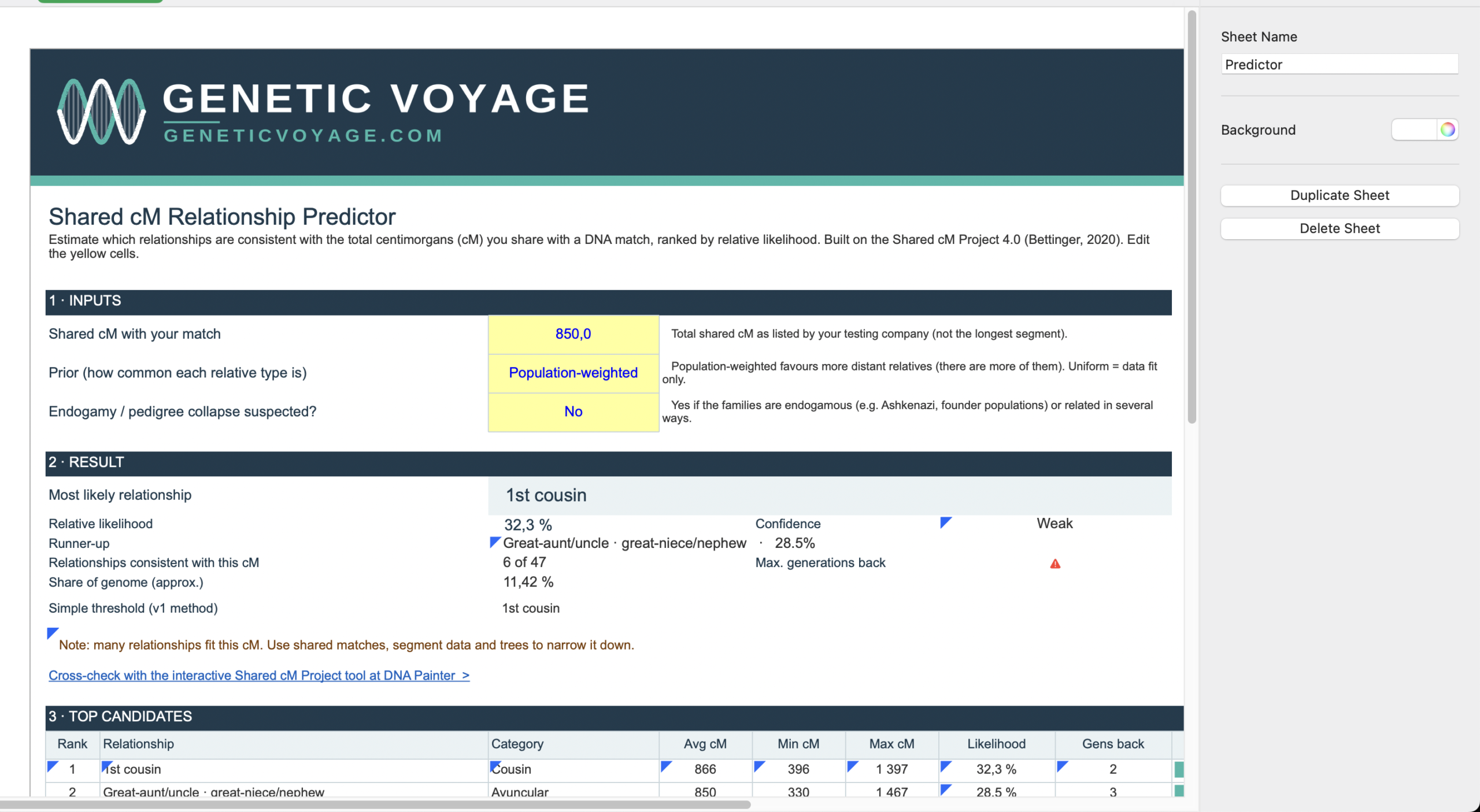
Preview of the Predictor sheet: inputs, result summary, and the top 10 ranked relationship candidates.
Shared centimorgans (cM) are one of the most useful pieces of information when evaluating an unknown DNA match. However, the same amount of shared DNA can be consistent with several different genealogical relationships.
Instead of giving you one label, this workbook shows every relationship whose published range includes your cM value, ranks them by relative likelihood, and tells you how confident that ranking really is.
What's Inside the Workbook
- Predictor – Enter total shared cM and get the most likely relationship, runner-up, and a ranked top 10 table with in-cell bars.
- Batch Matches – Paste names and shared cM for up to 100 matches and get a ranked result for each one.
- Shared cM Data – Reference table of 47 relationship types with average, minimum and maximum shared cM, plus meioses and generations back to the common ancestor.
- Methodology – Editable model settings, how the ranking works, limitations, and sources.
- Lookup Table – The simple threshold lookup from the first version, kept for comparison.
What the Predictor Sheet Shows
Edit the yellow input cells and everything else recalculates:
- Shared cM with your match – The total shared cM reported by your testing company.
- Prior setting – Choose population-weighted (more distant relatives are more numerous) or uniform (data fit only).
- Endogamy / pedigree collapse flag – Switch on a warning when the families involved are endogamous or related in several ways.
- Most likely relationship and relative likelihood – The top candidate with a Strong, Moderate or Weak confidence label.
- Runner-up – The second-best candidate, so you can see how close the call is.
- Consistent relationships and generations back – How many of the 47 relationships fit your cM, and how far back the common ancestor could be.
- Share of genome and simple threshold result – Approximate percentage shared, plus the original v1 threshold answer for comparison.
- Top 10 candidates – Category, average and range in cM, likelihood, and generations back for each candidate.
Who Is This Template For?
This spreadsheet is designed for genealogists researching unknown or uncertain DNA matches who want a transparent, structured way to see which relationships are plausible for a given amount of shared DNA.
It works for newer DNA genealogists learning how to interpret shared cM, and for experienced researchers who want to screen a long match list quickly with the batch sheet before looking at matches in depth.
Best Use Cases for This Template
- Unknown DNA matches: See which relationships fit when the genealogical connection is not yet known.
- Screening a match list: Paste up to 100 matches and quickly spot the close ones that deserve attention.
- Comparing alternatives: Keep several plausible relationships visible instead of prematurely choosing one.
- Teaching and learning: Explore how shared cM, distance, and half versus full relationships relate, using the reference data and editable settings.
- Sensitivity testing: Change the prior settings on the Methodology sheet and see how stable the ranking is.
Important: Shared cM Does Not Identify a Relationship by Itself
The likelihoods in this workbook are a transparent approximation built from the published averages and ranges of the Shared cM Project. They are not the same as the probabilities used by DNA Painter or the testing companies, so cross-check important matches with the interactive Shared cM Project tool at DNA Painter.
Other evidence can help narrow the possibilities, including the match's age, known family relationships, shared matches, chromosome segments, family trees, geographic clues, surnames, and documented genealogical records.
The underlying statistics do not account for endogamy or pedigree collapse, which can result in more shared DNA than expected for a given relationship. For relationships more distant than half 2nd cousin, the project averages were determined only from submissions where DNA was shared.
Use this template to organize and evaluate evidence — not to replace genealogical verification.
Step-by-Step Relationship Research Workflow
- Enter the shared cM. Type the total shared cM into the yellow input cell on the Predictor sheet.
- Set the prior and endogamy flag. Choose population-weighted or uniform, and flag endogamy if it applies to the families involved.
- Read the top candidates. Look at the most likely relationship, the runner-up, and the confidence label. A Weak label means many relationships fit.
- Check generations and consistency. Compare the number of consistent relationships and the generations back with the ages of both people and your known tree.
- Screen many matches at once. Use the Batch Matches sheet to rank up to 100 matches, then focus on the ones with strong results.
- Cross-check and gather more evidence. Verify with the DNA Painter Shared cM tool, then review shared matches, chromosome segments, and family-tree overlap.
- Record your working hypothesis. Keep the relationship you consider most plausible, with the alternatives, in your match tracker or research log.
Data Source & Attribution
Relationship ranges come from The Shared cM Project 4.0 (March 2020) by Blaine T. Bettinger, licensed under CC BY 4.0. Values were transcribed from the interactive version by Jonny Perl at DNA Painter.
Frequently Asked Questions
What is a shared cM relationship predictor?
A shared cM relationship predictor uses the amount of DNA two people share to identify relationship categories that may be compatible with that amount. It provides a ranked range of possibilities rather than automatically identifying one exact relationship.
Can shared cM tell me exactly how two people are related?
No. The same shared cM amount can occur across multiple relationship types. Shared DNA is most useful when combined with age, family-tree information, shared matches, chromosome evidence, and traditional genealogical research.
How does the workbook calculate relative likelihood?
A relationship counts as consistent only if your cM falls inside its published range. Each consistent relationship is scored by how close your cM is to its average, adjusted by a prior for how common that relative type tends to be, and the scores are normalized across all 47 relationships. The settings are visible and editable on the Methodology sheet.
Is this the same as the DNA Painter probabilities?
No. The workbook uses its own transparent model built from the Shared cM Project averages and ranges. It is useful for ranking and screening, but you should cross-check important matches with the DNA Painter tool.
What do Strong, Moderate and Weak confidence mean?
They describe how dominant the top candidate is. A Strong label means one relationship clearly leads, while Weak means many relationships fit the cM value. The thresholds are adjustable on the Methodology sheet and are a readability aid, not a statistical test.
Does the template handle endogamy?
No. The underlying statistics do not account for endogamy or pedigree collapse. The endogamy flag shows a warning that the ranking may make a match look closer than the true relationship, so treat the result with extra caution.
Can I use it with different DNA testing companies?
Yes. It only needs the total shared cM, which every major testing platform reports. The exact figure can vary slightly between companies.
Does it work in Apple Numbers?
The template is designed for Microsoft Excel and Google Sheets. Apple Numbers has limited support for some Excel features such as data validation and conditional formatting, so layout and behavior may differ there.
Ready to Analyze Your DNA Matches?
Download the free Shared cM Relationship Predictor Template and rank the possible relationships for your matches in seconds.
📥 Download the Free cM Template