Understanding AutoCluster Reports: A Beginner's Visual Guide to DNA Match Grouping
Transform an overwhelming list of hundreds of genetic matches into an organized, color-coded map of your family branches.
If you have ever opened your commercial DNA test results on MyHeritage, AncestryDNA, or 23andMe, you were likely greeted by an intimidating wall of names. Hundreds—or even thousands—of genetic matches listed row after row, separated only by shared centimorgans (cM) and estimated relationships.
How do you systematically figure out which matches belong to your paternal grandfather, which ones come from your maternal grandmother, and which ones hold the key to a missing ancestor?
The answer lies in automated visual match grouping, best known as AutoClustering. In this comprehensive guide, we will break down exactly how AutoCluster reports work, how to decode the colored matrices, what the mysterious grey squares mean, and how you can use this visual method to break through stubborn genealogy brick walls.
💡 Quick Summary: What is AutoClustering?
AutoClustering is an automated algorithm (originally invented by E.J. Blom of Genetic Affairs) that analyzes your DNA matches and groups them based on mutual shared DNA.
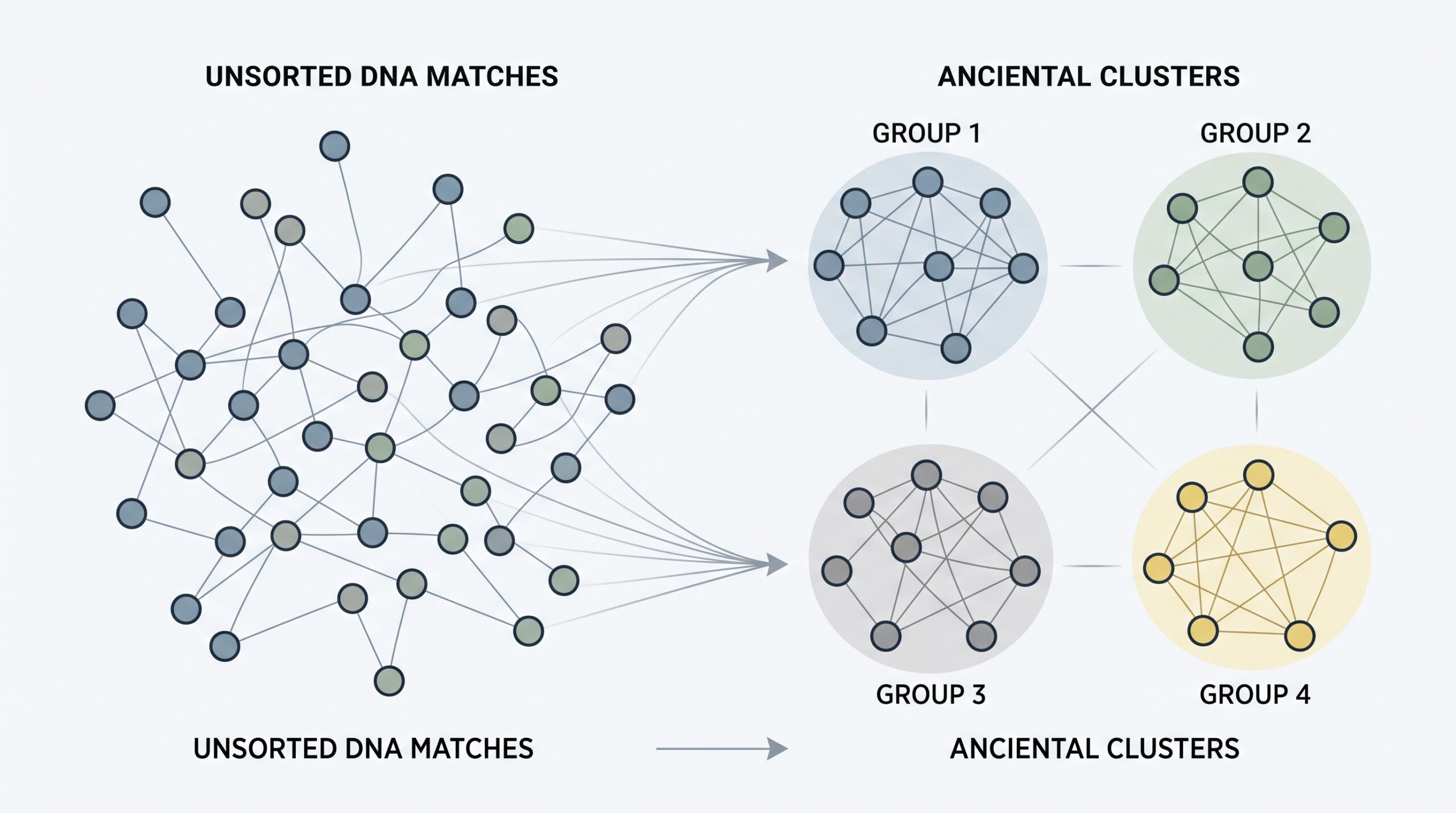
Instead of examining matches individually, AutoClustering organizes matches who also share DNA with each other into color-coded visual boxes along a diagonal matrix. Each distinct colored cluster may represent a shared ancestral line or specific family branch in your tree.
How Does a DNA Match Cluster Form?
The important clue is not simply that several people match you. They also share DNA with one another, creating a recognizable network.
As more mutually connected matches are added, the algorithm can identify a cluster that may correspond to a shared ancestral line or family branch.
1. The Biological Logic Behind AutoClustering
To understand why AutoClustering is so effective, you must first understand the fundamental concept of In-Common-With (ICW) matching.
When you take an autosomal DNA test, you inherit 50% of your DNA from your father and 50% from your mother. When two of your DNA matches also share DNA with each other, it can indicate that the three of you are connected through the same ancestral line or a common ancestor.
In traditional paper genealogy, grouping matches manually by shared cousins is called the Leeds Method (created by Dana Leeds). The Leeds Method uses colored spreadsheets to assign matches to four columns representing your four grandparent lines.
AutoClustering automates and elevates the Leeds Method:
- Scalability: While manual grouping becomes tedious with more than 20–30 matches, AutoCluster algorithms can analyze 50 to 100+ matches simultaneously in seconds.
- Mathematical Sorting: The software runs complex clustering algorithms (such as hierarchical clustering) to arrange matches in order, forming tight, visible squares along the diagonal of a chart.
- Branch Isolation: Instead of stopping at 4 grandparent lines, AutoClustering can isolate 10, 15, or 20+ distinct sub-clusters representing great-grandparents or 2nd great-grandparents.
2. Visual Anatomy: How to Read an AutoCluster Chart
An AutoCluster report consists of an interactive HTML matrix and an accompanying summary table. On the chart, both the horizontal axis (X-axis) and the vertical axis (Y-axis) contain the exact same list of DNA matches, listed in identical order.
Visual Anatomy of an AutoCluster Matrix
Simulated 6x6 match comparison matrix showing color-coded clusters along the diagonal.
🎨 The Colored Squares (Clusters)
When Match A and Match B share DNA with each other, the cell where their row and column intersect is filled with color. The software groups all mutually sharing matches together, creating distinct colored blocks along the top-left to bottom-right diagonal.
Rule: Everyone inside a single colored cluster likely descends from the same common ancestral couple.
⬛ The Grey Squares (Cross-Matches)
Grey squares appear outside the main colored boxes. A grey square means that a match in Cluster 1 also shares DNA with a match in Cluster 2.
Significance: Grey cells indicate that two clusters are closely related—such as two sibling branches, endogamy, or a match who is related to you through multiple family lines.
3. Critical Parameters: Setting Up Your AutoCluster Thresholds
Some AutoCluster tools allow you to adjust minimum and maximum centimorgan (cM) thresholds. Setting these parameters appropriately can make the difference between a clean, actionable chart and a chaotic, difficult-to-read result. The values below are practical starting points rather than universal rules, because different tools and family backgrounds can produce very different match patterns.
| Parameter | Recommended Value | Why It Matters |
|---|---|---|
| Maximum cM Threshold | 250 cM – 400 cM | Excludes close relatives (parents, siblings, aunts, uncles, 1st cousins). Close relatives share DNA with all your branches on that side, creating a massive "super-cluster" that masks individual lines. |
| Minimum cM Threshold | 15 cM – 20 cM | Excludes distant matches and small noise segments. Setting this too low (<10 cM) introduces false-positive IBS (Identity by State) matches and bloats the matrix. |
| Target Match Count | 50 to 100 Matches | Provides enough statistical density to form clear, distinct clusters without overwhelming the visualization. |
Too Loose, Too Strict — or Just Right?
Thresholds change the evidence available to the algorithm. The goal is not simply to produce more clusters, but to produce clusters that are useful for genealogical investigation.
⚠️ Endogamy & Pedigree Collapse Alert
If your ancestors come from isolated or endogamous populations (such as Ashkenazi Jewish, French Canadian, Acadian, or isolated island communities), your AutoCluster report may look like one giant solid block of color with grey squares everywhere.
Fix: Raise your minimum threshold to 35 cM – 50 cM to filter out background population sharing and force the algorithm to isolate closer, more recent family branches.
4. Where to Access AutoCluster Tools
Several major testing platforms and third-party tools provide automated or semi-automated cluster analysis. Features and availability can change, so always check the current documentation for the service you use:
1. MyHeritage DNA (AutoClusters)
MyHeritage provides AutoClusters directly through its DNA tools. You can generate a report under DNA → DNA Tools → AutoClusters. The resulting report organizes matches into color-coded groups designed to help identify shared ancestral lines.
2. FamilyTreeDNA (Family Finder AutoCluster)
FamilyTreeDNA (FTDNA) supports AutoCluster analysis for Family Finder matches. Depending on the current implementation and account setup, the analysis may be available directly or through supported third-party workflows.
3. Genetic Affairs (Automated Third-Party Tool)
Genetic Affairs is closely associated with the development of AutoClustering by E.J. Blom. It provides automated clustering and related genealogy analysis tools, with availability depending on the DNA database and current platform integrations.
4. GEDmatch (Clustering Tools)
GEDmatch offers several tier-one clustering tools, including ICW Cluster diagrams and segment-based cluster matrices, allowing you to combine matches uploaded from AncestryDNA, 23andMe, MyHeritage, and FTDNA into a single combined cluster analysis.
5. Step-by-Step Workflow: How to Analyze Your AutoCluster Report
Generating the report is only the beginning. Here is the exact 4-step workflow professional genetic genealogists use to solve family mysteries using AutoClusters:
Step 1: Identify "Anchor Matches" in Each Cluster
Open your cluster report and scan through Cluster 1 (Red). Look for 1 or 2 matches whom you already know and have documented in your family tree (e.g., a known 2nd cousin on your maternal grandfather's side). This match becomes your Anchor Match.
Step 2: Assign an Ancestral Label to the Cluster
Once you identify an Anchor Match, you can immediately label that entire colored box. If Match A is your known 2nd cousin through your great-grandparents John Smith & Mary Jones, then everyone else in that red cluster likely descends from or connects to John Smith & Mary Jones!
Step 3: Analyze Unknown Matches Inside the Cluster
Look at the unknown matches grouped inside that labeled cluster. Instead of searching their family trees blindly, you now know exactly which branch of your tree to look at. Compare their trees for recurring surnames or locations connected to your Smith/Jones line.
Step 4: Use Advanced Tools on Unlabeled Clusters
If a cluster contains zero known relatives, examine the matches inside it using chromosome browsers or segment mapping. Check if matches in that cluster share a triangulated segment on a specific chromosome to verify their shared origin.
From a Cluster to a Family Branch
You do not need to identify every match at once. One reliable anchor can turn an anonymous cluster into a researchable branch of your family tree.
🧬 AutoClustering vs. DNA Triangulation: What’s the Difference?
It is easy to confuse AutoClustering with DNA Triangulation, but they operate at different levels of precision:
- AutoClustering (Macro-View): Groups matches based on In-Common-With (ICW) data without looking at specific chromosome coordinates. It tells you who belongs to the same family branch.
- DNA Triangulation (Micro-View): Compares matches on a chromosome browser to prove they share the exact same physical DNA segment (start and end base-pair coordinates). It proves where on your genome the inheritance occurred.
Pro Tip: Use AutoClustering first to quickly group your matches, then use Triangulation to investigate and verify the segment connection!
6. Take Your Research Further on Genetic Voyage
AutoClustering is a central pillar of intermediate match analysis. Combine this guide with our free tools, calculators, and advanced step-by-step tutorials across the site:
7. Frequently Asked Questions About AutoClusters
🎯 Ready to Master Your Match List?
Put theory into practice! Use our free, device-only calculators to evaluate shared cM scores, or dive into our advanced segment mapping guides.