
Triangulated Group (TG) Excel Template
Document and organize triangulated DNA segments, participating matches, chromosome coordinates, and your supporting genealogical evidence in one structured research spreadsheet.
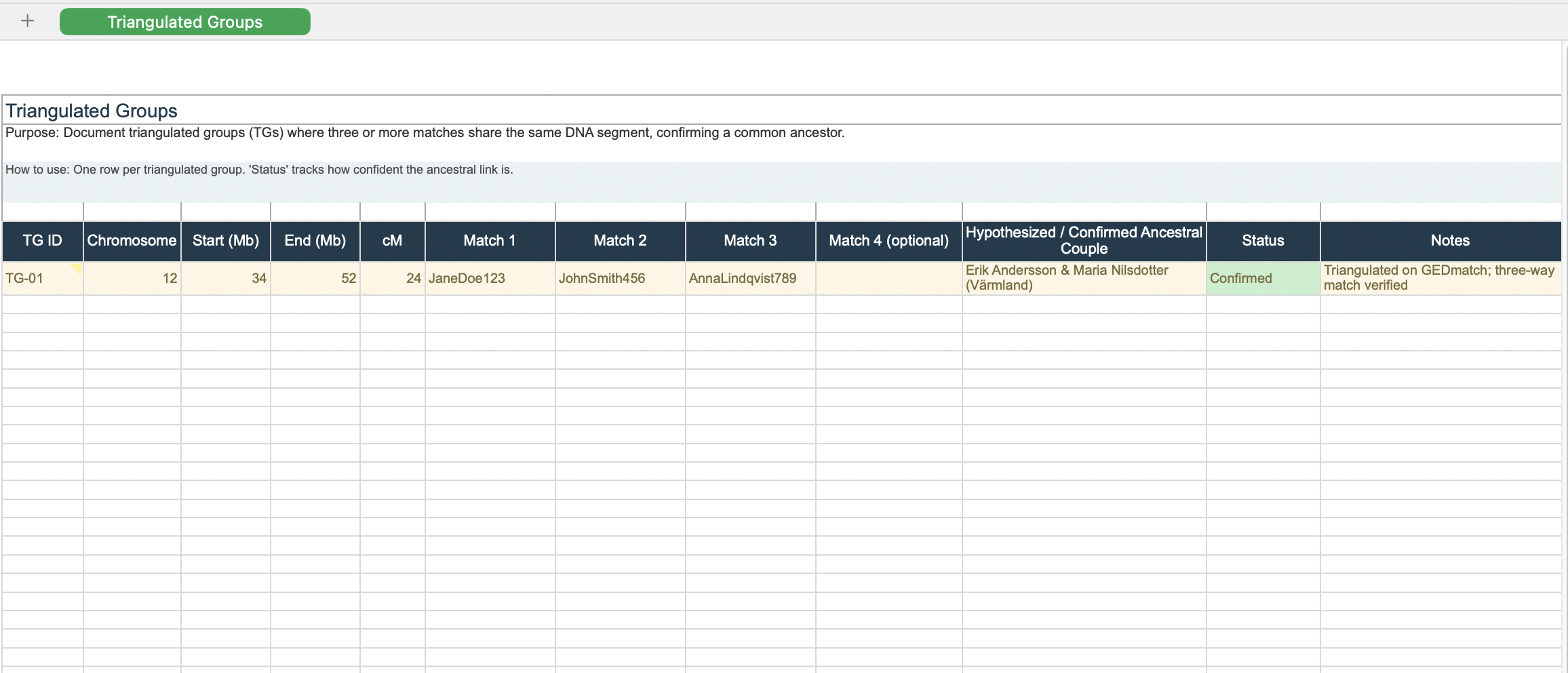
Preview of the Triangulated Group research worksheet.
A triangulated group is a research group in which multiple DNA matches share the same overlapping chromosome segment and also match one another on that segment. When the segment is supported by appropriate comparison data and genealogical evidence, this can provide strong evidence that the shared DNA comes from a common ancestral line.
The purpose of this template is to help you document that evidence clearly rather than relying on screenshots, scattered notes, or memory.
Why Keep a Triangulated Group Research Log?
DNA triangulation research can quickly become difficult to manage when the same chromosome segment appears across several matches, testing platforms, and family trees. A structured research log gives you one place to record the segment, participants, coordinates, hypotheses, and supporting evidence.
- Keep chromosome and segment information organized in one place.
- Record which matches participate in each triangulated group.
- Connect DNA evidence with your traditional genealogical research.
- Track which ancestral couple or family line is being investigated.
- Document how a triangulated group was verified and what evidence supports it.
- Make it easier to revisit older DNA research months or years later.
Who Is This Template For?
This template is designed for genealogists who are already working with chromosome segment data and want a more systematic way to document triangulation research.
It is especially useful for researchers working with segment data from platforms and tools such as FamilyTreeDNA, MyHeritage, GEDmatch, or other services that provide chromosome-level comparison information.
Pre-Formatted Columns Included
The worksheet provides dedicated fields for recording the core information needed to investigate and document triangulated DNA segments:
- TG ID / Name – Give each triangulated group a unique identifier.
- Chromosome Number – Record chromosome 1–22 or X where applicable.
- Overlap Start Coordinate – Record the beginning of the shared segment.
- Overlap End Coordinate – Record the end of the shared segment.
- Shared Segment Size (cM) – Record the reported genetic length of the segment.
- Participating Testers – Document the matches included in the group.
- Confirmed Ancestral Couple / MRCA – Record the current genealogical hypothesis when supported.
- Verification Status & Evidence – Document how the group was evaluated and what evidence supports it.
Best Use Cases for This Template
- Organizing chromosome research: Keep segment coordinates and participating matches together.
- Testing ancestral-line hypotheses: Compare DNA evidence with family trees and documented genealogy.
- Breaking through research problems: Use multiple matching segments to investigate possible ancestral connections.
- Documenting evidence: Preserve the reasoning behind a triangulation conclusion instead of recording only the final relationship hypothesis.
- Long-term DNA research: Create a research history that can be updated as new matches and genealogical discoveries become available.
Important: A Shared Segment Alone Does Not Prove Triangulation
Three people sharing DNA with the same tester is not, by itself, sufficient to establish a triangulated group. The relevant matches should also be compared with one another, and the chromosome segment and coordinates need to be evaluated carefully.
Segment length, comparison methodology, platform limitations, phasing, endogamy, and the quality of the available genealogical evidence can all affect how confidently a segment should be interpreted.
For that reason, use this spreadsheet as a research and documentation tool, not as an automatic proof generator.
Step-by-Step Triangulation Research Workflow
- Identify a candidate segment. Find a chromosome segment shared between your test kit and multiple DNA matches.
- Compare the participants. Where the available tools allow it, verify whether the participating matches also share the relevant segment with one another.
- Record the segment. Enter the chromosome number, start and end coordinates, reported cM, and participating testers in the template.
- Investigate the genealogy. Compare family trees, surnames, locations, dates, and other documentary evidence for possible shared ancestral lines.
- Record your hypothesis. Add the suspected ancestral couple or family line only when the evidence supports that working hypothesis.
- Document the verification. Record the tools used, comparison results, supporting records, and any remaining uncertainty.
Frequently Asked Questions
What is a triangulated group in DNA genealogy?
A triangulated group is a set of DNA matches that share the same chromosome segment and also match one another on that relevant segment. Researchers use this pattern, together with genealogical evidence, to investigate whether the segment may have been inherited from a common ancestral line.
Does a triangulated group prove a specific ancestor?
Not by itself. A triangulated segment can provide strong supporting evidence for a shared ancestral line, but identifying the specific ancestor or ancestral couple requires additional genealogical research.
How many matches are needed for a triangulated group?
There is no need to treat a single numerical threshold as a universal rule. The important point is that the relevant matches share the segment and that the relationships between the participants are evaluated appropriately.
What chromosome information should I record?
Record the chromosome number, start and end coordinates, reported segment length, participating matches, and the source or comparison tool used to identify the segment.
Can I use this template with GEDmatch or FamilyTreeDNA?
Yes. The spreadsheet is designed as a general research log for chromosome-level DNA segment research and can be used alongside platforms that provide relevant segment comparison data.
Should I record uncertain triangulation results?
Yes. Recording uncertain or provisional results can be valuable, provided that you clearly label them as hypotheses rather than confirmed conclusions. This makes it easier to revisit the evidence when new matches or records become available.
Why use an Excel spreadsheet for DNA triangulation?
A spreadsheet makes it easier to compare multiple groups, preserve chromosome coordinates, track participating matches, and document the reasoning behind your conclusions in a consistent format.
Ready to Organize Your DNA Triangulation Research?
Download the free Triangulated Group Excel Template and start documenting your chromosome segment research in a structured, reusable format.
📥 Download the Free TG Template